Before You Start
To exchange Bitcoin for Monero on btcswapxmr.com, you need two things: some BTC in a wallet you control, and a Monero wallet address to receive your XMR. That's it. No account, no email, no ID scan.
If you don't have a Monero wallet yet, download the official
Monero GUI Wallet from getmonero.org, or use a mobile option like
Monerujo (Android) or Cake Wallet (iOS/Android). Generate a new wallet, copy your address —
it starts with a 4 and is 95 characters long — and you're ready.
Tip: Always double-check your XMR address before submitting. Monero addresses are long and look similar. One wrong character means you lose the funds permanently. Copy-paste, don't type manually.
Step-by-Step Exchange Walkthrough
Open the exchange form on the homepage
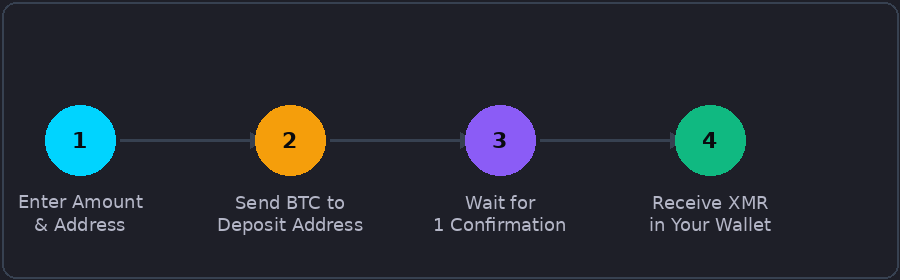
Navigate to btcswapxmr.com and scroll to the exchange widget. The form shows two fields: "You Send" and "You Receive." By default, BTC is selected as the send currency and XMR as the receive currency — exactly what we need.
Enter the amount of Bitcoin you want to swap
Type in the amount of BTC you want to send. The form will automatically calculate how much XMR you'll receive based on the live market rate, minus a 0.15% service fee. The minimum exchange amount is 0.004 BTC. The rate refreshes in real time as market prices shift.
Enter your Monero wallet address
Paste your XMR receiving address into the "Recipient Address" field. The form validates the address format automatically — if it shows a red border, check your address again. Monero also supports subaddresses (starting with 8) and integrated addresses, both of which are accepted.
Click "Create Exchange" and confirm
After clicking the button, you'll be taken to the order page. This page shows a unique Bitcoin deposit address and the exact amount to send. The order is valid for 24 hours. Send the exact amount shown — not more, not less — to the deposit address from your Bitcoin wallet.
Wait for confirmation and receive XMR
Once your Bitcoin transaction reaches 1 blockchain confirmation (typically 10–15 minutes for the BTC network), the system processes the exchange and sends Monero to your wallet. You can track the status on the order page in real time.
Important: Send funds only to the deposit address shown on your order page. This address is unique to your order. Do not reuse it. Do not send ETH, LTC, or any other coin to a BTC deposit address — such transactions cannot be recovered.
How Long Does the Exchange Take?
Most BTC → XMR exchanges on btcswapxmr.com complete within 2 to 9 minutes after receiving 1 Bitcoin confirmation. The total time depends on how congested the Bitcoin network is when you send.
| Stage | Typical Time | Notes |
|---|---|---|
| BTC network detection | Instant (0-conf shown) | Detected as soon as broadcast |
| Waiting for 1 BTC confirmation | ~10–20 min | Depends on fee paid for BTC tx |
| Exchange processing | Under 1 min | Automatic, no manual step |
| XMR sent to your wallet | Under 2 min | Monero confirms very fast |
| Total typical time | 15–30 min | Faster with higher BTC fee |
The 2–9 minute figure shown on the site refers to the processing time after BTC is confirmed. If you pay a high-priority fee when sending Bitcoin, the first confirmation often arrives in 10 minutes, making the full round-trip close to 15 minutes.
Fees Explained
btcswapxmr charges a flat 0.15% service fee. This is deducted from the amount being exchanged, and the network fee for sending Monero to you is included — no hidden costs at checkout.
The only other fee you pay is the Bitcoin network fee when you initiate your send. This goes to Bitcoin miners and is set by your own wallet. Using a medium or high fee priority will get your transaction confirmed faster.
Minimum and Maximum Amounts
The minimum exchange amount when sending BTC is 0.004 BTC. When sending XMR, the minimum is 0.5 XMR. Maximum amounts per single transaction are 10 BTC or 3,000 XMR.
For amounts above these limits, contact support to arrange a larger order. High-volume traders can also access the API to automate exchanges.
Tips for Getting the Best Rate
Check the rate before you send
The rate displayed when you create the order is locked for the duration of that order (24 hours). However, if you created an order but BTC and XMR prices moved significantly before you sent, you can simply create a new order to get the updated rate.
Watch Bitcoin mempool congestion
When the Bitcoin network is busy, confirmation times grow. Use a tool like mempool.space to check current congestion before sending. If fees are very high, consider waiting a few hours — Bitcoin blocks come every 10 minutes regardless, but confirmation priority depends on the fee you attach.
Use a self-custody wallet
Sending directly from a personal wallet gives you full control over the transaction fee. Exchange withdrawals often apply their own flat fees and may add delays.
Ready to swap BTC for XMR?
No account, no ID, no waiting. Start your exchange in under a minute.
Start Exchange Now →Troubleshooting
My transaction isn't showing up after 30 minutes
First, check the order page — it will show the current status. If your BTC transaction has 0 confirmations after 30 minutes, it likely has a very low fee and is stuck in the mempool. Your funds are not lost; the transaction will eventually confirm or expire and return to your wallet (unconfirmed transactions expire after roughly 72–336 hours depending on the wallet you used).
I sent BTC but to the wrong address
If you sent to a different address than the one shown on your order page, this cannot be undone automatically. Contact support immediately with your transaction ID. Recovery depends on the specific situation.
The XMR hasn't arrived in my wallet
Monero transactions are private and require 10 confirmations before your wallet shows the balance as "unlocked." This typically takes about 20 minutes after the XMR is sent. Your wallet may show the transaction as "pending" during this time — this is normal behavior for all Monero wallets, not a problem with the exchange.
Common Questions
BTC to XMR Quick Reference Table
Estimated XMR received at the current live rate. Actual amounts depend on rate at confirmation time.
Rate includes 0.15% service fee. Minimum is 0.004 BTC. Network fees included.
How to Track Your Exchange After Sending
When you create an order, you receive a unique order ID. Save this — it's the only way to look up your order status. You can check your order status at any time by visiting the order tracking page with your order ID.
The status will show one of these states:
Advanced Tips for Power Users
Batching multiple swaps
If you want to exchange more than 10 BTC in total, you can create multiple sequential orders. Each order is independent and there's no link between them. Wait for one to complete before creating the next, as each generates a fresh deposit address.
Using Replace-by-Fee (RBF) for stuck Bitcoin transactions
If you send BTC with a low fee and it gets stuck in the mempool, you can use RBF (Replace-by-Fee) to replace it with a higher-fee version — but only if you enabled RBF when creating the transaction. Wallets like Sparrow, Electrum, and BlueWallet support this. If RBF isn't available, you can try CPFP (Child Pays for Parent) by sending a new transaction spending the unconfirmed output with a high fee.
Timing your exchange
Bitcoin mempool congestion directly affects how quickly your BTC confirms. During periods of high on-chain activity, a low-fee transaction might wait hours. Check mempool.space to see current fee rates before sending. Setting a fee appropriate for confirmation in 1–2 blocks ensures your order processes within the optimal window.
Privacy-maximizing workflow
For users who want maximum privacy: (1) Access btcswapxmr.com via Tor Browser. (2) Send BTC from a self-custody wallet that has not previously been associated with any KYC exchange. (3) For best pre-swap Bitcoin privacy, run your BTC through a CoinJoin (Sparrow/Wasabi) before sending. (4) Receive to a Monero subaddress in a wallet you control. (5) After receiving, wait for sufficient Monero confirmations before using the XMR.